Field tracks
Purpose. Show the history of field values. For example, a task estimate was raised from 8 to 12 hours, or a release end date was moved. The page answers the questions “when did it change” and “who changed it”.
Do not confuse with ordinary tracks: field tracks are not about work time but about the history of values.
Who sees it. Roles with permission for the “Field tracks” page.
How to open. Menu Work → Field tracks.
What is on the screen
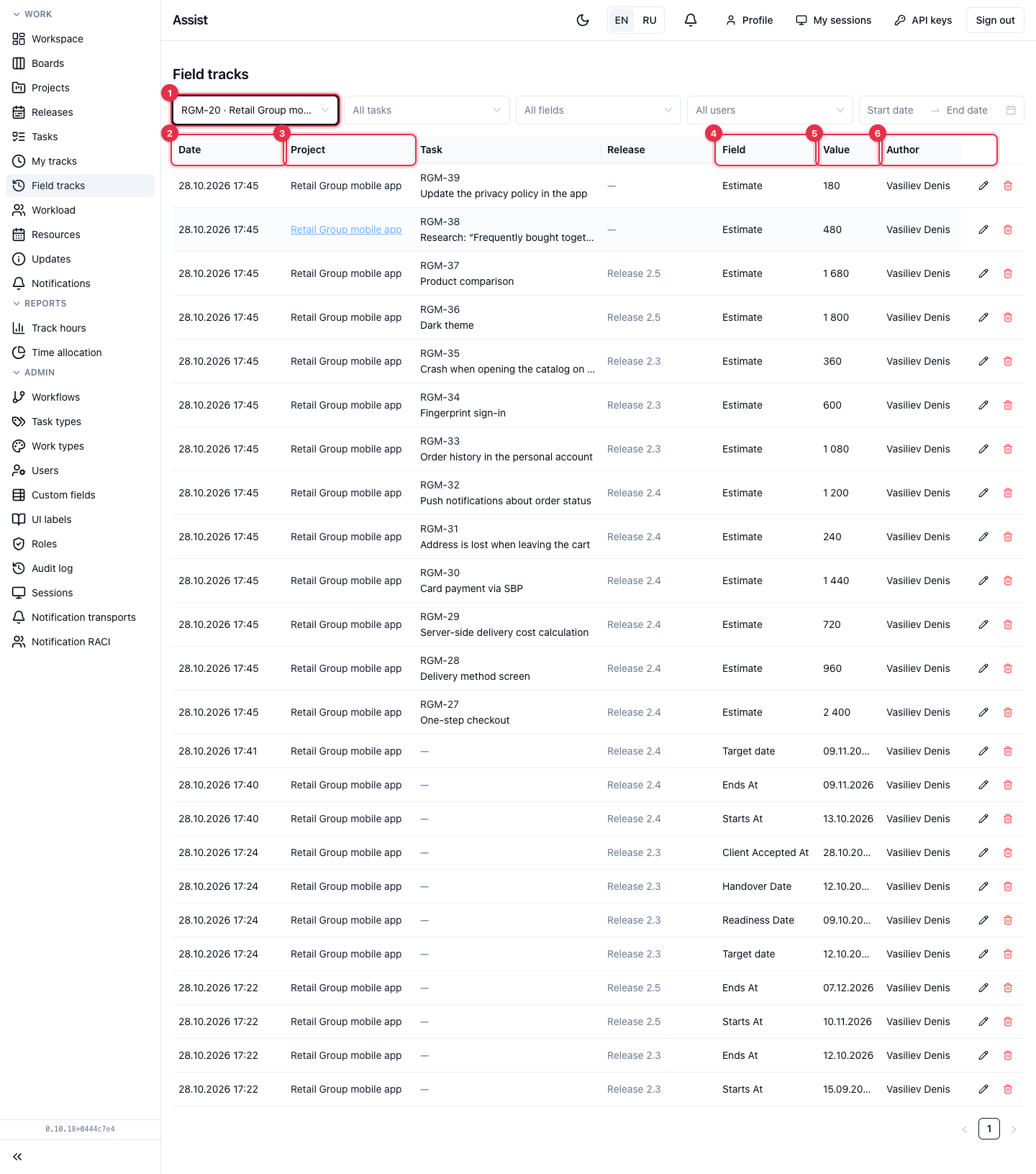
- Filters by project, task, field, user, and period.
- Date — when the value was recorded.
- Project, Task, Release — what the record refers to. Click to open the object in a new tab.
- Field — which field changed: “Estimate”, “Start”, “End”, “Target date”.
- Value — the new value. For an estimate these are minutes: 480 means 8 hours.
- Author — who made the change. Automatic records are marked “System”.
- The pencil and trash can on the right edit and delete a record.
Where records come from
| Source | Meaning |
|---|---|
| Field edit | A person changed the value in a card |
| Manual | The value was entered with the “Add value” button |
| Initial value | The record was created with the task, release, or project |
| Automation | The value was set by a workflow |
Which fields get into the history
Only fields with the Trackable checkbox enabled in the field constructor. For tasks these are numeric and yes/no fields, plus editable dates of tasks, releases, and projects. If the field you need does not appear in the table, check the checkbox.
What you can do
Enter a value manually
- Click Add value.
- Choose the object and the field and enter the value.
- Save.
Correct or delete a record
- Click the pencil or trash can in the row.
- Confirm. On deletion the cabinet warns “The field value will be recomputed”.
Editing and deleting recompute the current field value in the card. Use this carefully.
Frequently asked questions
The table is empty: “No tracks yet”. No field has tracking enabled, or there have been no changes yet.
See also
- My tracks — work hours.
- Custom fields.