New task
Purpose. Create a task or a subtask in a project.
Who sees it. The administrator, manager, and developer can create tasks.
How to open.
- The Create task button in the project header or on the “Scope” tab.
- The Create task quick action on the “My work” page.
- The “plus” in the row of an existing task: the form opens for a subtask.
What is on the screen
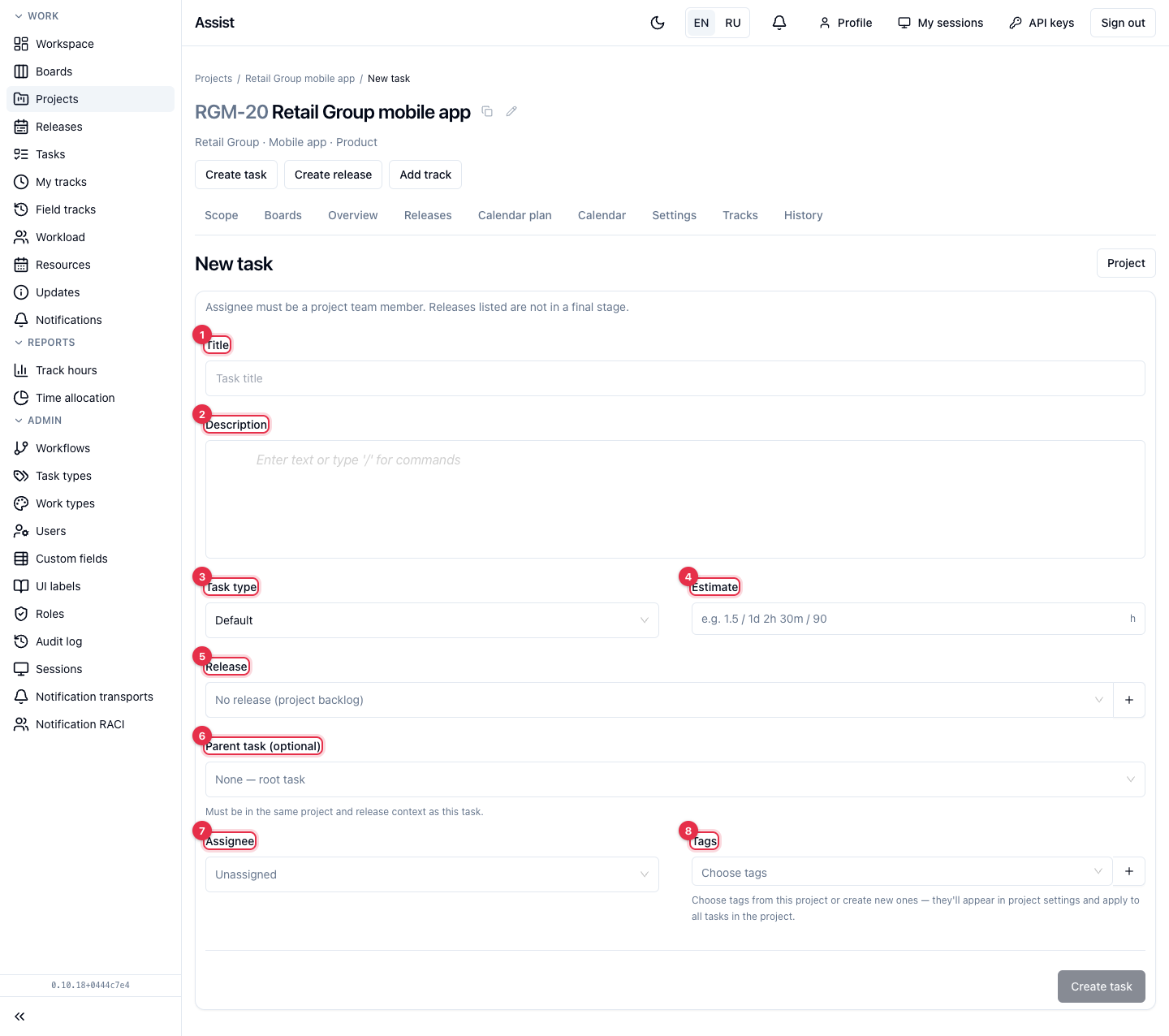
- Title — the only required field. The task cannot be saved without it.
- Description — text with formatting. Start a line with
/to insert a heading, a list, or another block. - Task type defines the task workflow: Default, Story, Bug. The available types are limited by project and release settings.
- Estimate — how long the task will take. Formats:
1.5(hours),1d 2h 30m,90(minutes). The unit can be switched next to the field. - Release — any unfinished project release or “No release (project backlog)”. The “plus” button next to it creates a new release without leaving the form.
- Parent task (optional) — the parent task for a subtask. The parent must be from the same project and release.
- Assignee — only from the project team.
- Tags — project tags. A needed tag can be created with the “plus” button: it appears in the project settings at once.
What you can do
Create a task
- Enter a title.
- Fill in the other fields if needed.
- Click Create task.
Result. The task appears in the project table. For a subtask the release is inherited from the parent, and the form says so.
What cannot be set in the form
Start and end dates are not in the form. Set them in the task card. You need them to move the task to work: in the standard workflow this requires an assignee, an estimate, and dates.
If the form does not save
| Message or situation | Cause | Solution |
|---|---|---|
| “Not enough permission for fields” | The role cannot fill in some fields | Clear that field or contact the administrator |
| The assignee is not in the list | They are not on the project team | Add them on the “Settings” tab |
| The needed type is not in the list | The type is not allowed in the project or release | Change the list of allowed types in the settings |