Resources. Plan
Purpose. The planner's workplace: a table for a month. Projects and employees are on the left, days are on top, and the cells hold the hours a person must give a project that day.
Who sees it. Roles with permission for the “Resources” section. Roles with permissions on the “Resource plans” collection can edit cells.
How to open. Menu Work → Resources, the Plan tab.
What is on the screen
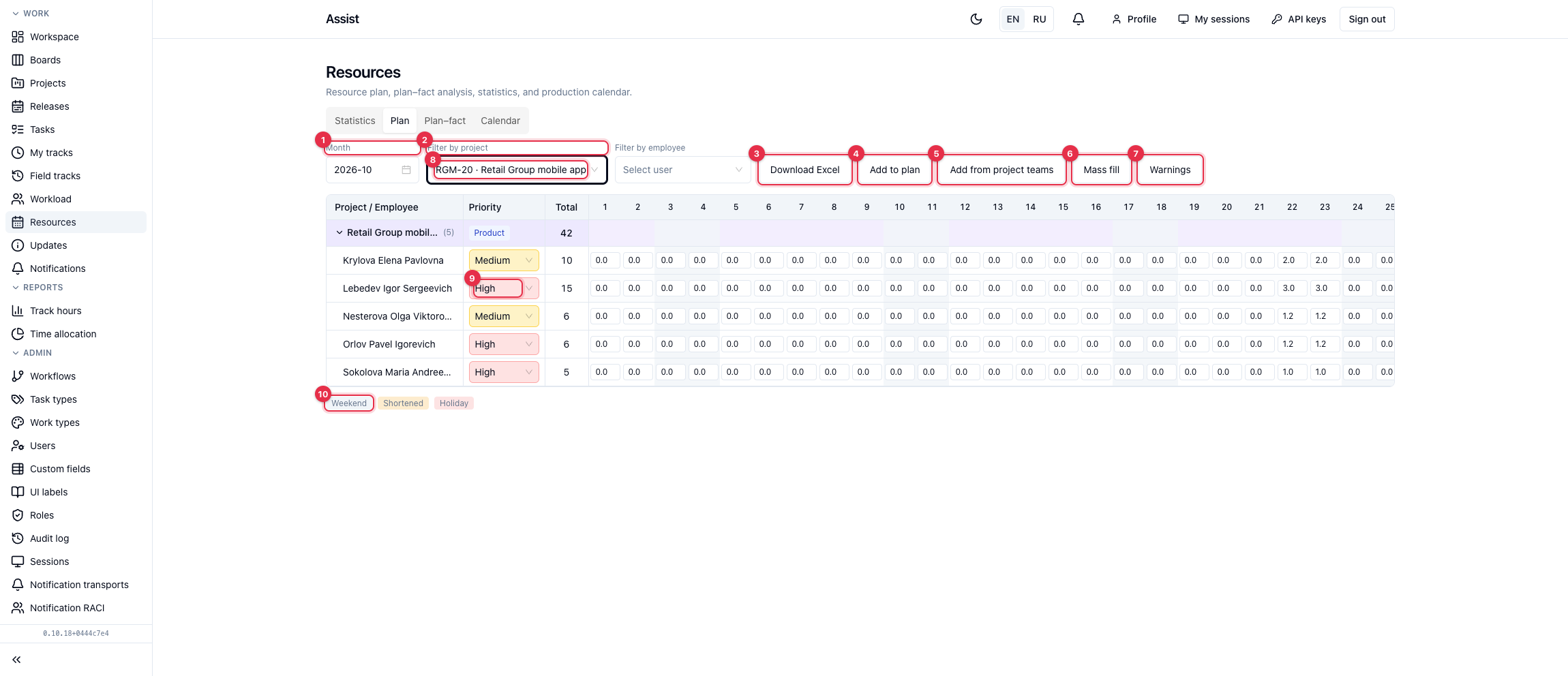
- Month chooses the period.
- Filters by project and by employee.
- Download Excel exports the table.
- Add to plan adds an employee to a project: choose a project and a person.
- Add from project teams creates empty rows for all team members. With a project filter, only that project's people are added, otherwise those of all projects. Those already added are skipped.
- Mass fill writes the same hours to each working day of a range: you need a project, an employee, a range, and hours per day. Weekends, holidays, and shortened days get zero.
- Warnings show the plan's problems for the month.
- A project row. The arrow on the left collapses people. In brackets is the number of people, in the “Total” column the sum of hours.
- An employee row. In the Priority column you choose “High”, “Medium”, or “Low”, and in the day cells you enter hours.
- Under the table there is a legend: weekends, shortened days, and holidays are colored.
What you can do
Edit hours
- Click a cell.
- Enter the number of hours.
- Leave the cell: the value is saved.
Remove a person from a project
Click “Remove” in their row and confirm.
See problems
The Warnings button opens two lists:
- Daily overload. More than 8 hours are planned for an employee on a day across all projects. Such cells are outlined in red.
- Fact without a plan row. There are tracks on a project but the employee is not in the plan. The Add to plan button creates a row.
Priority
Priority does not affect calculations. It suggests whose time is more important when redistributing people.