Task types
Purpose. A type defines the card kind (Bug, Story, Default) and the workflow: bugs and stories can go through different stages. The type color is visible on labels in the scope, boards, and calendars.
Who sees it. The administrator with permission for the “Task types” collection.
How to open. Menu Admin → Task types.
What is on the screen
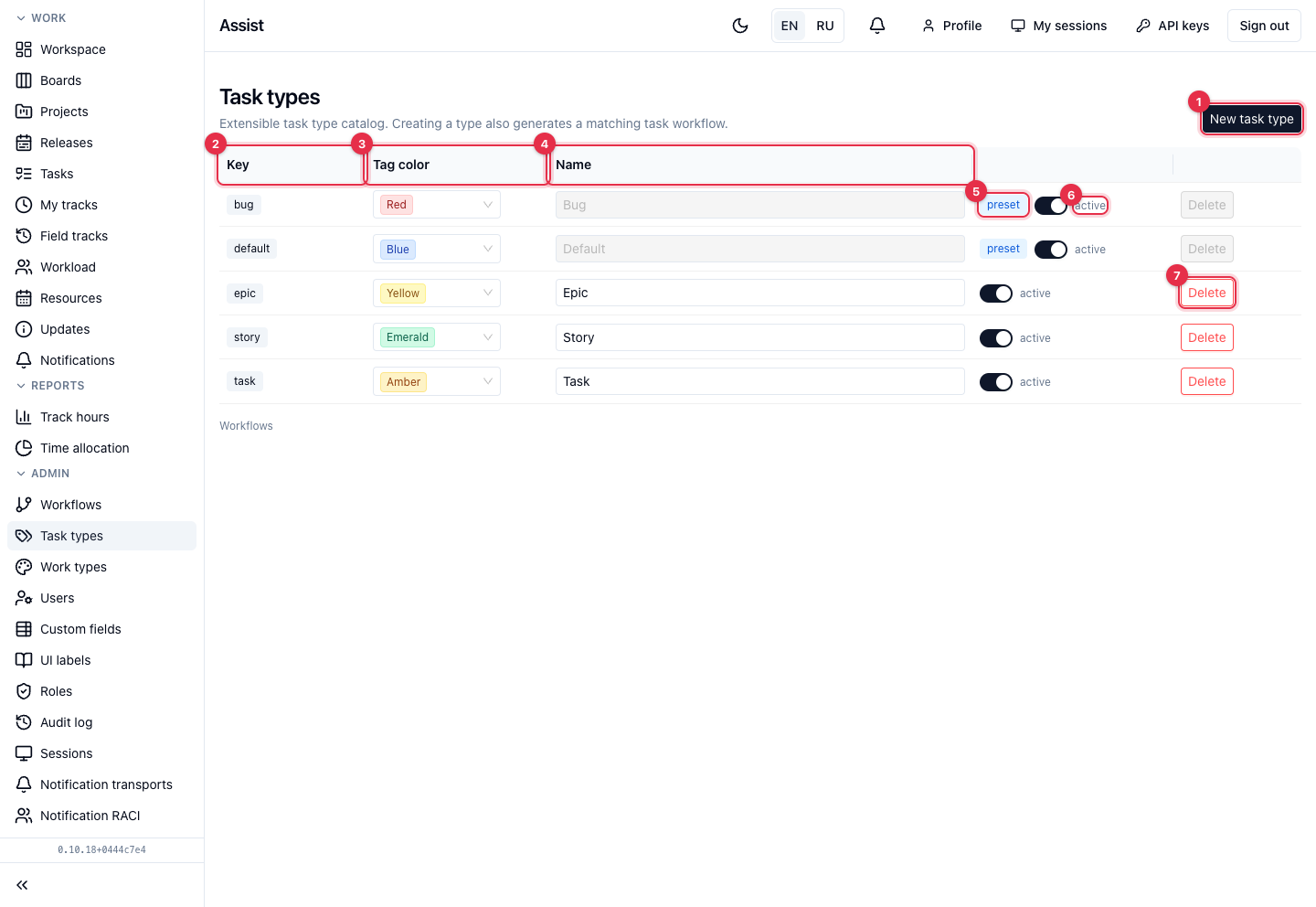
- New task type creates a type. Together with it the cabinet generates a workflow; it can be opened with the “Open workflow” button.
- Key — the service name of the type.
- Tag color — the label color. Changed right in the table.
- Name — what people see. The names of preset types cannot be changed.
- The preset label marks types shipped with the product (Bug and Default).
- The active switch. A disabled type cannot be chosen for new tasks; existing ones stay.
- Delete removes the type.
What you can do
Create a type
- Click New task type, enter a key and a name.
- Choose a color.
- Open the new type's workflow and configure the stages: “Configuring workflows”.
Restrictions
- Preset types cannot be deleted.
- A type cannot be deleted while tasks use it: the cabinet names the number and asks you to reassign.
- The last active type cannot be turned off.
Relation to other settings
The types allowed in a project and a release are set when they are created: “Projects”, “Releases”. The type of an existing task is changed in its card. Kinds of work in time are set in work types. The process of a type is configured in workflows.