Audit log
Purpose. Records every change in the system: creation, editing, deletion, stage change, sign-in and session refresh, settings changes. It is needed to find out who changed a value and when, and to investigate disputed situations. The log is read-only: records cannot be edited or deleted.
Who sees it. Roles with permission for the “Audit log” page (usually the administrator).
How to open. Menu Admin → Audit log.
What is on the screen
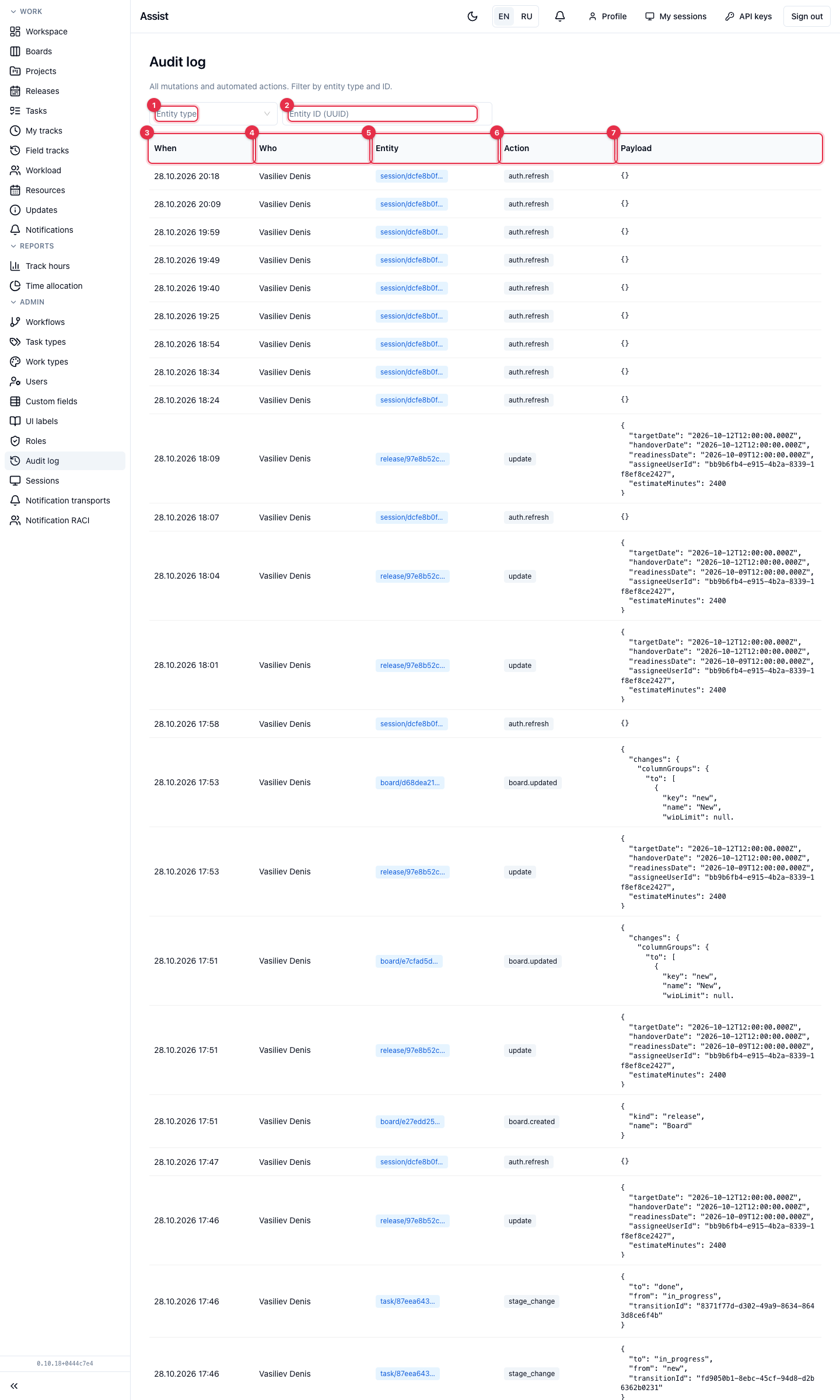
- Entity type: task, release, project, board, session, etc.
- Entity ID (UUID) — the history of one record. The identifier can be copied from the page address or from the “Entity” column.
- When the event occurred.
- Who performed the action.
- Entity — the record type and the beginning of its identifier, for example
task/87eea643…. - Action:
create,update,stage_change,board.updated,auth.refresh, and others. - Payload — details in JSON: which fields changed, old and new values. For a stage change it is shown where the record moved from and to.
What you can do
- Find out who moved a task's stage. Filter by the “task” type,
stage_changerecords:fromandtoare visible in the data. - Find out who changed a release's estimate or dates.
updaterecords of the release, with changed fields in the data. - Find out when a person signed in.
auth.refreshrecords record a session refresh.
Where it is easier to view the history of one task
On the “History” tab of the task card: changes are written in human language. Who is signed in to the cabinet now is shown on the “Sessions” page.