UI label dictionary
Purpose. The dictionary stores the texts people see: field names and similar labels. Each text has a key, and a key can have a translation into each language. Thanks to this, a field is called “Клиент” for a Russian-speaking employee and “Client” for an English-speaking one.
Who sees it. The administrator: permission for the dictionary page is required.
How to open. Menu Admin → UI labels.
What is on the screen
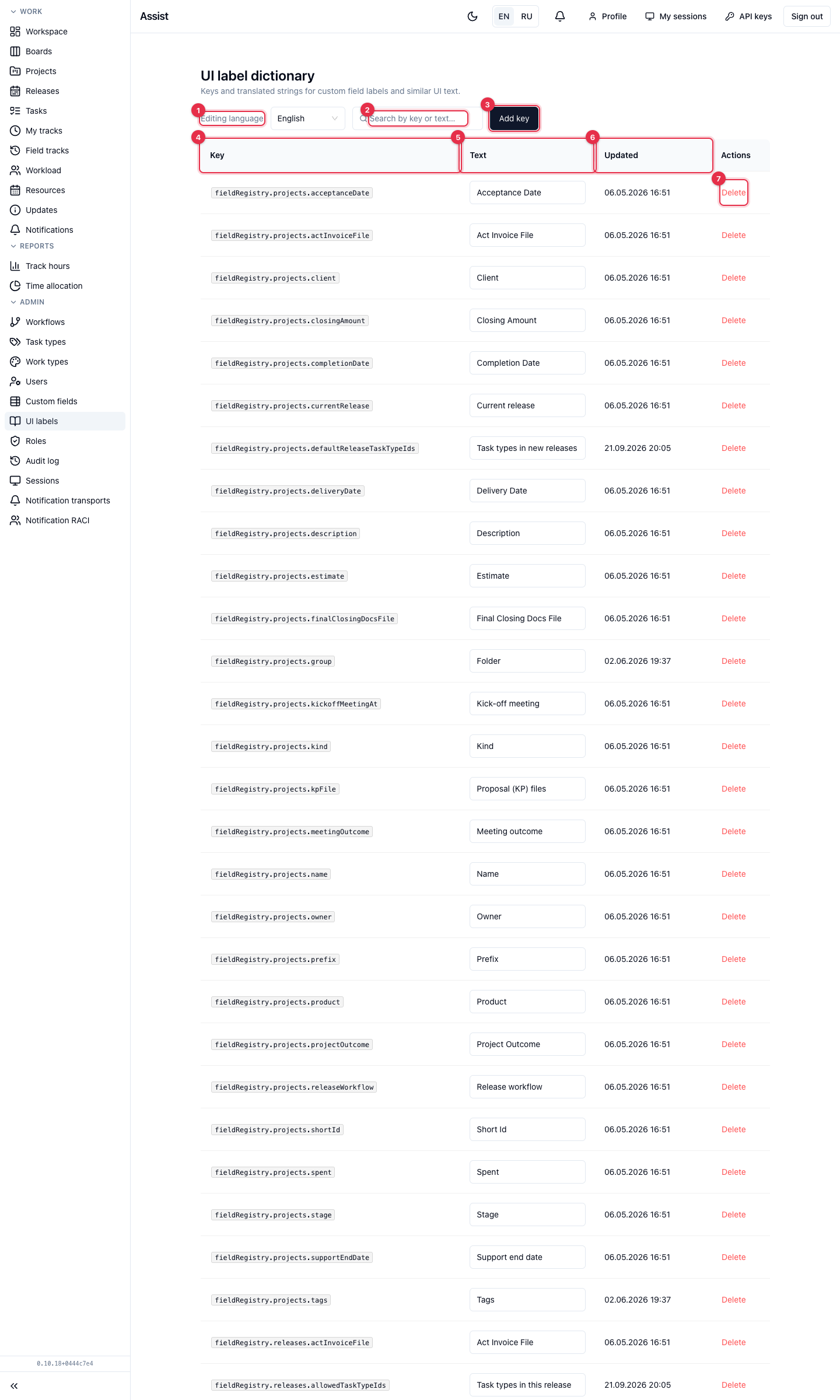
- Editing language: Russian or English. Texts are edited separately for each language.
- Search by key or text.
- Add key. A key consists of lowercase segments separated by dots, each starting with a letter, for example
contract.title. - Key — the service name. For built-in fields, keys start with
fieldRegistry, for examplefieldRegistry.projects.client. - Text — the translation for the selected language. Edited right in the table.
- Updated — when the text was edited.
- Delete removes the key in all languages. The cabinet warns about it.
What you can do
Link a label to a field
- Open the field constructor, create or open a field.
- Choose the label source “Dictionary key” and specify an existing key.
- The cabinet substitutes the translation for the interface language. “Label” remains a fallback text.
If a field's name is the same for everyone, the dictionary is not needed: choose “Plain text (fixed label)”.
Interface language
The EN / RU switch in the header changes the language of the whole interface. Dictionary texts are shown in the selected language.